
| 일 | 월 | 화 | 수 | 목 | 금 | 토 |
|---|---|---|---|---|---|---|
| 1 | 2 | 3 | 4 | 5 | 6 | |
| 7 | 8 | 9 | 10 | 11 | 12 | 13 |
| 14 | 15 | 16 | 17 | 18 | 19 | 20 |
| 21 | 22 | 23 | 24 | 25 | 26 | 27 |
| 28 | 29 | 30 |
- window
- Xcode
- shorebird
- Session
- iOS16
- darkmode
- geofencing
- UIButton
- rxswift
- Apple
- FLUTTER
- JPA
- Swift
- error
- 웹뷰
- IOS
- Realm
- Archive
- SwiftUI
- mac
- 개발자
- 맥
- 한글
- 이미지
- Git
- MacOS
- Firebase
- appstore
- Code
- github
- Today
- Total
EEYatHo 앱 깎는 이야기
Git ) Git Config - EEYatHo iOS 본문
git에는 3종류의 설정 파일이 있습니다.
system < global < local ( 오른쪽일수록 우선순위가 높습니다. )
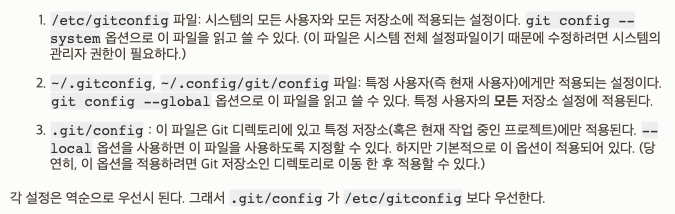
git config --list설정된 값들이 뭐가있는지 확인
같은 키값이 여러개일 수 있는데, 아래일 수록 우선순위가 높습니다.
( local config가 제일 밑에 쓰임 )
git config [설정 이름]어떤 값이 들어있는지 확인
가능한 설정값 목록 ( 영어, git 공식글 )
git-scm.com/docs/git-config.html
Git - git-config Documentation
When using the deprecated [section.subsection] syntax, changing a value will result in adding a multi-line key instead of a change, if the subsection is given with at least one uppercase character. For example when the config looks like [section.subsection
git-scm.com
일반 적인 git config 설명 ( 한글, git 공식글 )
git-scm.com/book/ko/v2/Git%EB%A7%9E%EC%B6%A4-Git-%EC%84%A4%EC%A0%95%ED%95%98%EA%B8%B0
Git - Git 설정하기
8.1 Git맞춤 - Git 설정하기 지금까지 Git이 어떻게 동작하고 Git을 어떻게 사용하는지 설명했다. 이제 Git을 좀 더 쉽고 편하게 사용할 수 있도록 도와주는 도구를 살펴본다. 이 장에서는 먼저 많이
git-scm.com
'Git' 카테고리의 다른 글
| Git ) GithubAction2 - EEYatHo iOS (0) | 2021.09.06 |
|---|---|
| Git ) git 툴 특징, 차이점 ( cmd, xcode, sourceTree ) - EEYatHo iOS (0) | 2021.08.09 |
| Git ) GithubAction - EEYatHo iOS (0) | 2021.08.04 |
| Git ) macOS에서 커맨드로 git 사용시 계정 변경하는 법 - EEYatHo iOS (0) | 2021.04.23 |
| Git ) .gitignore 적용되는 파일, 안되는 파일 - EEYatHo iOS (0) | 2021.04.23 |
